
If you run a before- or after-school program, you already know the truth: the hard part isn’t the enrichment or the snack schedule — it’s the paperwork. Sign-in sheets that are out of date by 3:15 p.m., pickup lists taped to a clipboard, month-end billing that eats an entire weekend, and parents texting to ask whether their kid made it off the bus. After school program software exists to take all of that off your plate. This guide explains exactly what after school program software is, who it’s for, the features that actually matter, what it costs in 2026, how to choose, and how to switch without losing a weekend — so you can spend less time on admin and more time with kids.
What is after school program software?
After school program software is a purpose-built platform for managing school-age care — before-school care, after-school care, holiday camps, and enrichment programs. It brings the four or five tools most programs cobble together (a registration form, an attendance binder, a billing spreadsheet, a payment processor, and a messaging app) into one connected system where enrollment, attendance, billing, and parent communication all talk to each other.
Here’s why that matters: in school-age care, the data is constantly moving. A child drops in on Tuesday but not Wednesday. A sibling is on a different plan. A grandparent shows up for pickup who isn’t on the list. When your tools are disconnected, every one of those moments becomes a manual task — and a chance for something to slip. Good after school program software keeps a single source of truth: one roster, one record per child, one invoice per family, updated in real time.
It’s also different from generic daycare software. Most daycare platforms assume a full-day, fixed schedule. After-school programs run on the opposite: variable, part-time, drop-in-heavy schedules with pickups from multiple schools and buses. The right software is built for that flexibility.
The quick answer
After school program software automates enrollment, attendance, safe check-in and pickup, billing, and parent messaging for before-care, after-care, camps, and enrichment programs — replacing four or five disconnected tools with one dashboard. The best options (like MyKidReports) handle drop-ins, subsidies, and a free parent app, and start free.
Who uses after school program software?
“After-school program” covers a lot of ground, and the best software flexes to fit each one:
- School & district-run programs — before- and after-care attached to elementary or middle schools, often serving hundreds of families with tight licensing requirements.
- Community centers, YMCAs & Boys & Girls Clubs — large, multi-site programs that need per-site rosters, ratios, and consolidated reporting.
- Private enrichment & tutoring programs — STEM, arts, language, and academic programs that bill by session or package.
- Faith-based & nonprofit aftercare — programs that juggle sliding-scale tuition, subsidies, and donations.
- Camps & out-of-school-time (OST) programs — holiday camps, summer camps, and school-closure days that spin up and down fast.
- Home-based & small programs — a single director who needs to look professional without a full back office.
What they share: fluctuating attendance, safety-critical pickups, and billing that’s too complex for a spreadsheet. Whatever the shape of your program, the goal of the software is the same — make the admin invisible.
The real cost of running an after-school program on paper
Before we get to features, it’s worth naming what the manual approach actually costs — because it’s more than time:
- Hours every week. Manually taking attendance, chasing payments, and answering “did my child arrive?” texts can eat 8–15 hours a week for a mid-sized program — time that should go to programming and staff.
- Money left on the table. Missed drop-in charges, forgotten late fees, and billing errors quietly add up. Programs that automate billing routinely recover revenue they were losing without realizing it.
- Safety and liability risk. A paper pickup list is only as good as the person reading it at a chaotic dismissal. One unauthorized pickup is one too many.
- Compliance stress. When a licensing inspector or a grant funder asks for attendance and ratio records, “let me dig through the binder” isn’t an answer. You need reports in a click.
- Parent trust. Families judge your program partly on how professional it feels. Clunky sign-ups and surprise invoices erode the trust that drives re-enrollment and referrals.
The right after school program software attacks every one of these at once. Here’s what to look for.
The 9 features that matter most
Not all after school software is equal. Some tools just digitize your paperwork; the best ones actually remove the work. These are the nine capabilities that separate the two.
1. Fast online registration & enrollment
Families should be able to enroll in minutes from their phone — fill out emergency contacts, allergies, and authorized pickups, sign your policies, and pay any deposit — without you re-keying a thing. Look for customizable enrollment packets per program, a waitlist so full sessions don’t cost you families, and the option to run sign-up either self-serve or admin-led.
2. Flexible scheduling & drop-ins
This is the make-or-break feature for after-school. Your software must support recurring weekly schedules and day-by-day drop-ins, plus separate hours, capacity, and rates for before-care vs after-care — ideally from one account. If a system forces every child into a single fixed daily schedule, it wasn’t built for school-age care.
3. Contactless check-in/out & authorized pickup
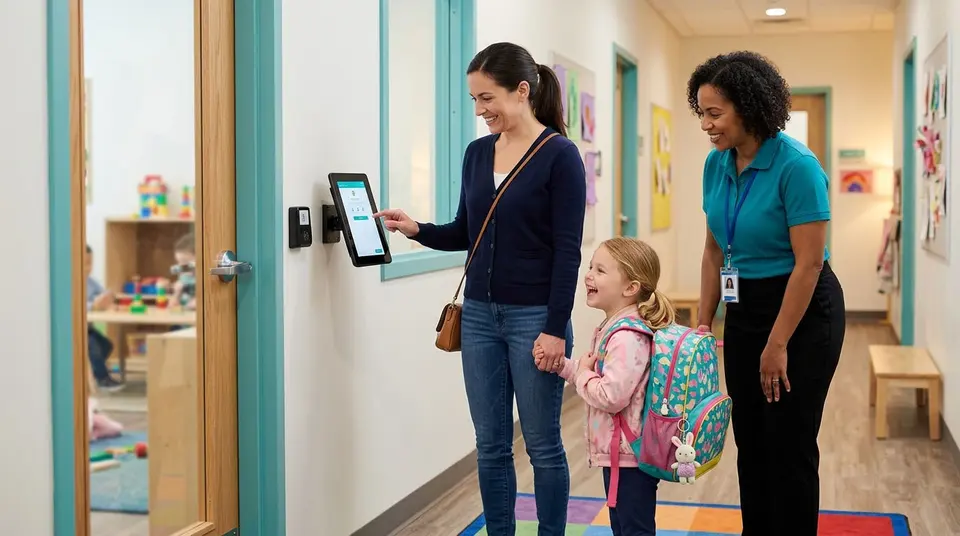
A tablet kiosk (or QR/code-based check-in) creates a time-stamped, signature-backed record of every arrival and departure. The best systems display only approved pickup contacts for each child, so safety isn’t left to memory at a busy 5:30 p.m. dismissal. This is also your legal record if anyone ever questions who picked up whom.
4. Automated billing & autopay
This is where after school software pays for itself. The right tool converts attendance into invoices automatically — hourly, drop-in, weekly, or monthly — and collects payment on autopay so you’re not chasing checks at pickup. The gold standard is one invoice per family, even when siblings are on different plans, plus automatic late-payment reminders so you never have to send an awkward “you’re past due” text.
5. Subsidy, sibling discounts & split billing
Real programs have messy money: a state subsidy covers part of the tuition, a sibling discount applies, and a parent pays the rest. Strong software handles subsidy splits and discounts automatically and shows exactly what each payer owes — without you running the math by hand every month.
6. Real-time parent communication
A free parent app plus SMS and email keeps families in the loop: arrival confirmations, activity updates, reminders, and balance notices. Because it’s built into the same system, you’re never copying data between a messaging app and your roster — and parents get one place for everything.
7. Daily activity logs & reports
Parents love knowing how the afternoon went. Look for quick, prebuilt activity logging (snack, homework help, outdoor time, late-bus arrival, incident notes) that staff can tap in seconds and parents see instantly. It turns your program from a black box into a daily highlight reel — and it’s a genuine re-enrollment driver.
8. Staff scheduling & attendance
After-school staff are part-time and shift-based, which makes coverage its own puzzle. Look for staff clock-in, shift scheduling, and a live view of staff-to-child ratios so you always know you’re covered and compliant — and so payroll is accurate without a separate timesheet.
9. Reporting for licensing & funding
You should be able to pull attendance, enrollment, and billing reports in a couple of clicks — exactly the records licensing inspectors, CACFP food programs, and grant funders ask for. Built-in reports beat exporting to a spreadsheet and reformatting every single time.
Run your whole after-school program from one dashboard
Enrollment, drop-in billing, safe check-in, subsidies, and a free parent app — built for before- and after-care. Free for up to 5 kids.
Best after school program software in 2026
Here’s how the main options compare on the features that matter most for before- and after-school programs. Pricing and free plans are the biggest differentiators — many recreation tools charge steep annual fees, while paper and spreadsheets are “free” only until you count the hours.
| Software | Free plan | Drop-in & hourly billing | Check-in + authorized pickup | Free parent app | Starting price |
|---|---|---|---|---|---|
| MyKidReports | ✔ Up to 5 kids | ✔ | ✔ | ✔ | $0.99/child/mo |
| Brightwheel | ✘ | ✔ | ✔ | ✔ | Custom quote |
| Recreation-management tools | Varies | Limited | Varies | ✘ | $$$ / year |
| Paper + spreadsheets | ✔ | Manual | ✘ | ✘ | “Free” (costs hours) |
MyKidReports
MyKidReports after school program software is built specifically for school-age programs. It runs before-care and after-care from one account, handles drop-ins and monthly plans with automatic billing, includes a free parent app, and offers contactless check-in with authorized-pickup controls. Pricing is transparent: free for up to 5 children, then $0.99 per child per month, with no setup fees or contracts. It’s the most cost-effective option for small and growing programs, and it’s rated 5.0 on Capterra, GetApp, and Software Advice.
Brightwheel
A well-known, polished platform used across daycare and after-school. It’s feature-rich with strong communication and check-in, but pricing is capacity-based and quoted by sales, and there’s no free tier — which makes it a bigger commitment for smaller programs.
Recreation-management tools
Platforms built for parks-and-rec and activity registration can handle sign-ups and payments, but they’re often overkill, priced as flat annual licenses, and light on childcare-specific needs like ratios, authorized pickup, and daily reports.
Paper & spreadsheets
Free to start, expensive to run. Fine for a tiny program on day one; painful the moment you have variable schedules, subsidies, or more than a handful of families.
How to choose the right after school program software
Before you commit, run any tool through this checklist:
- Does it handle drop-ins and hourly billing? If your attendance varies day to day, this is non-negotiable.
- Can it run before-care and after-care separately? Different hours, capacity, and rates — ideally from one dashboard.
- Is check-in safe and documented? Time stamps, signatures, and authorized-pickup controls.
- Does it handle subsidies and sibling discounts? If you serve subsidized families, manual math will cost you hours and errors.
- Is there a free parent app? Some vendors charge families or staff per seat — avoid that.
- How does pricing scale? Per-child pricing is predictable; big annual licenses aren’t.
- Can you start without a demo or contract? The best way to know is to try it with your real roster.
- Will migration cost you? Look for free data migration so switching isn’t a project.
How much does after school program software cost?
Pricing models vary widely in 2026:
- Per-child pricing — you pay a small monthly amount per enrolled child (for example, MyKidReports is free up to 5 children, then $0.99/child/month). Predictable, and it scales with your program instead of punishing growth.
- Capacity-based / custom pricing — some larger platforms price on your licensed capacity and require a sales call for a quote, which can mean paying for seats you don’t use.
- Flat annual licenses — common with recreation-management tools, often several hundred to several thousand dollars a year regardless of how many kids you actually serve.
For most before- and after-school programs, transparent per-child pricing with a free tier is the most cost-effective way to start — you can run the software with your real families before you pay a cent.
What programs gain when they switch
✔ Hours back every week — attendance and billing run themselves.
✔ More on-time payments — autopay and reminders end the chase.
✔ Safer dismissals — documented, authorized-only pickup.
✔ Fuller enrollment — a professional sign-up and happy parents drive referrals.
How to switch without the headache
The number one reason directors stay on paper (or a tool they’ve outgrown) is the fear that switching will be a nightmare. With the right platform, it isn’t:
- Send your export. Pull your current roster, families, and plans into a simple spreadsheet — or export from your old system.
- We migrate it free. A good vendor imports your data for you, so you’re not re-typing hundreds of families.
- Go live the same day. Set your programs, hours, and rates, invite families to the parent app, and start checking kids in.
The best time to switch is between sessions or at month-end, when your roster is stable. Look specifically for “free migration” and same-day setup so the transition is measured in hours, not weeks.
Switch in a day — we’ll migrate your data free
Send us your roster and go live the same day. No contract, no setup fees.
Getting started: your first week
Here’s a realistic first-week plan once you’ve picked your software:
- Day 1–2: Set up your programs (before-care, after-care, camps), hours, capacity, and rates. Import your roster.
- Day 3: Turn on billing plans, autopay, and any subsidy or sibling-discount rules.
- Day 4: Set up the check-in kiosk and authorized-pickup lists for each child.
- Day 5: Invite families to the free parent app and send a short “here’s our new system” note.
- Week 2: Start posting daily activity updates and let the automated billing run its first cycle.
By the end of two weeks, the admin that used to consume your evenings mostly runs itself.
Before and after care runs on the same rails as the rest of the center. See how our childcare software handles check-in, ratios and billing for both.
Frequently asked questions
What is after school program software?
It’s a management platform that automates registration, attendance, billing, and parent communication for before-school, after-school, and out-of-school-time programs — replacing paper sign-in sheets, spreadsheets, and separate payment apps with one connected system.
How much does after school program software cost?
It ranges from free tiers up to several thousand dollars a year. Per-child models are the most predictable — MyKidReports, for example, is free for up to 5 children and then $0.99 per child per month with no setup fees or contracts.
What’s the best free after school program software?
MyKidReports is free for programs with up to 5 enrolled children and still includes billing, contactless check-in, and a free parent app, so you can run a small program at no cost and only pay as you grow.
Does after school software handle drop-ins and hourly billing?
The good ones do. Look specifically for day-by-day drop-in enrollment and automatic hourly-to-monthly billing — not every childcare tool supports the variable schedules that after-school programs run on.
How does contactless check-in and pickup work?
Families or staff check children in and out on a tablet kiosk or with a code, creating a time-stamped, signature-backed record. The system shows only approved pickup contacts for each child, so dismissal stays safe and documented.
Can one system run both before-care and after-care?
Yes — the best after school program software runs before-care, after-care, or both from a single account, with separate hours, capacity, and rates for each program.
Does it handle state subsidies and sibling discounts?
Strong platforms apply subsidy splits and sibling discounts automatically and show what each payer owes, so you don’t recalculate tuition by hand every month.
Will it help with licensing and CACFP reports?
Yes. Look for built-in attendance, ratio, enrollment, and food-program reports you can export in a click for licensing inspections and grant funding.
Is after school program software worth it for a small program?
Usually, yes. Even small programs lose hours each week to manual attendance and billing. With a free starting tier, you can automate those tasks without upfront cost and reclaim time for the kids.
How long does it take to set up?
Modern platforms are self-serve — many programs are up and running the same day, and tools that offer free data migration will move your existing rosters for you.
Do parents have to pay for the app?
They shouldn’t. The best platforms include a free parent app for families — avoid tools that charge families or staff per seat.
Can it manage multiple sites?
Yes — multi-site programs can run per-site rosters, ratios, and billing while rolling reporting up to one dashboard, which is essential for YMCAs, districts, and franchise-style programs.
Ready to simplify your after-school program?
Run enrollment, billing, check-in, and parent messaging in one place. Rated 5.0 on Capterra, GetApp & Software Advice. Start free — no demo, no contract.