A daycare check-in system is the first thing every family touches each morning, and the record your licensing inspector asks for first. This guide compares the three ways centers check children in today, kiosk, QR code and parent app, and what to look for in child care check-in software before you switch. Below, we show step by step how check-in works in MyKidReports.
The short version
Most centers do best with a QR code at the door that parents and staff scan with their phone, plus a kiosk with a 4-digit code as a backup. Every time is logged against the child.
Pick software where check-in feeds your room ratios, so the head count is live rather than a clipboard tally.
Check that only guardians on the child's record can sign the child out, and that the log exports for licensing visits.
Price: MyKidReports publishes its price: free up to 5 children, then $0.99 per enrolled child per month, check-in included.
$0.49 per ACH payment. A flat fee, whatever the amount: a $250 tuition payment and a $2,500 one cost the same. Card payments are 2.79%. Start free →
What child care check-in software does
Check-in software replaces the paper sign-in sheet. A parent or staff member checks each child in and out, and the software records who did it and when. Good systems then use that record for three more jobs: a live head count by room for ratios, an attendance history you can export for licensing, and billing for families who pay by the hour or day.
If your software only logs a time and stops there, you will still be counting heads by hand and re-typing attendance into billing.
Want to see a daycare check-in app working at a real front door? The kiosk section below walks through MyKidReports step by step.
QR code, kiosk or room tablet: which daycare check-in system fits your center
There are three common ways to check children in. Most centers use two or more side by side.
| Method | How it works | Best for | What to watch |
|---|---|---|---|
| QR code at the door, scanned with a phone | Parents and staff tap Check in or Check out in the app. The camera opens and they scan the QR code posted at the door. | Busy drop-off: nobody waits in line for a tablet. | Print the QR code and post it at every door families use. |
| Kiosk tablet at the entrance | A tablet at the door shows the QR code to scan and a keypad. Anyone without their phone types their 4-digit check-in code. | Centers with one main entrance, and a backup for forgotten phones. | Lock the tablet to check-in only. |
| Room tablet in each classroom | Teachers check in or out only the children in their own room, one at a time or in bulk. | Start of the day, half-days and field trips. | The room tablet should not open the rest of your admin. |
How the MyKidReports check-in kiosk works
This is the kiosk screen families see at the door. (The center's QR code is blurred in this picture.)
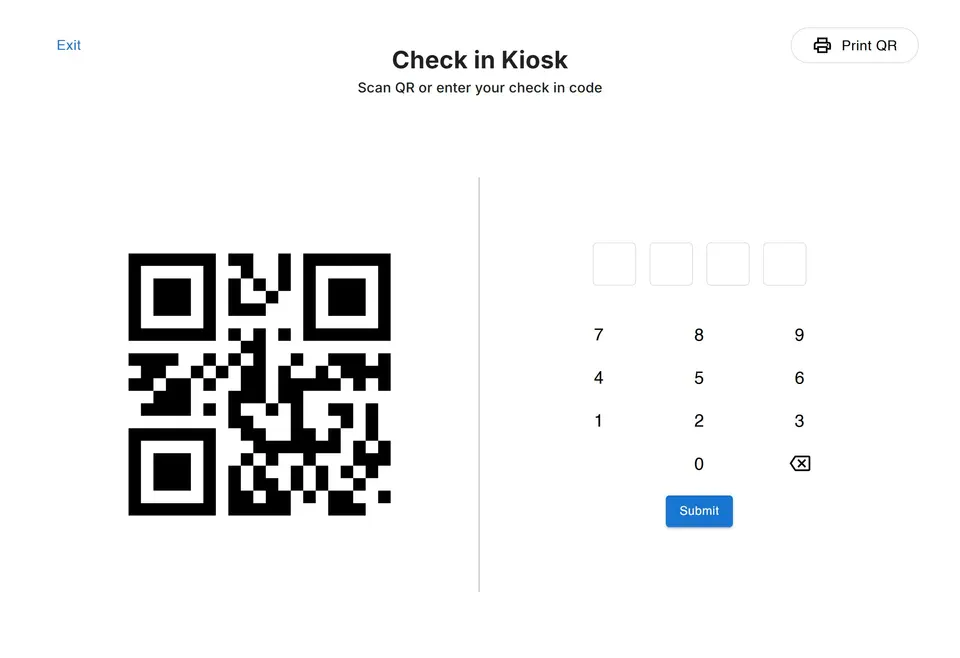
- Set up the kiosk once. Print your QR code and post it at the door. If you also want a kiosk, open Check in Kiosk on any tablet at the entrance. Add check-in questions or a required signature if you want them.
- Parents and staff check in. They tap Check in or Check out in the MyKidReports app, the camera opens, and they scan the QR code at the door. At the kiosk they can also type their 4-digit check-in code and tap Submit. Then they answer any questions and sign.
- Everything updates on its own. The time, the person and the signature are saved on the child's record, the room's live ratio updates, and the hours flow into billing and licensing reports.
- Teachers work from the room. A room tablet in each classroom lets teachers check in or out only the children in their own room, one at a time or in bulk, and shows the live ratio.
See every check-in option, ratio alerts and attendance reports on our daycare attendance and check-in page.
Check-in, ratios and billing. $0.99 per child per month.
Free for up to 5 children, no card required. Set up a kiosk in an afternoon.
Check-in questions and signatures, if you want them
In MyKidReports you decide what happens at the door. Turn on check-in questions and they appear at every drop-off, every pickup, or both. Answers can be yes/no, multiple choice or free text. Centers ask things like:
- Has your child eaten breakfast today?
- Any symptoms or fever in the last 24 hours?
- Who is picking up today?
- Any allergy updates or notes for the teacher?
Want a signature too? Require one, and the parent or staff member signs with a finger on the screen. Every answer and signature is time-stamped, saved on the child's record and can be exported to PDF.
Who can pick up: authorized pickup and the audit trail
Set who is allowed to pick up each child: parents, grandparents, a nanny. Sign-out only goes through if the person checking the child out is on that list. Every check-in and check-out records the time and who did it, so you always know who took each child home.
Ratios: check-in is your live head count
Every check-in and check-out re-counts the children and staff in each room. Each classroom shows its current ratio at the top of the screen. If a room slips out of ratio, it turns red, your dashboard shows an alert and staff are notified. That beats finding out during an inspection. See how ratio alerts work in MyKidReports.
Everything MyKidReports check-in includes
| Feature | What it does at your center |
|---|---|
| QR code at the door | Parents and staff tap Check in or Check out in the app and scan it with their phone. |
| Kiosk with 4-digit code | A tablet at the entrance for anyone without their phone. Print QR prints your code for the door. |
| Room tablet | Teachers check in or out only the children in their own room. |
| Bulk check-in and out | Select several children and check them all in or out at once. Handy for field trips and half-days. |
| Check-in questions | Yes/no, multiple choice or free text, at drop-off, pickup or both. |
| Digital signatures | Optional. Finger-signed, time-stamped and saved on the child's record. |
| Authorized pickup | Sign-out only goes through for people on the child's pickup list. |
| Live room ratios | Each room shows its ratio. Out of ratio, the room turns red and staff are notified. |
| Billing and subsidy hours | Attendance hours flow into tuition and subsidy claims, with no retyping. |
| Licensing reports | Daily roster, monthly summary, signatures log, ratio compliance and subsidy hours, ready to export. |
| Parent updates | Teachers post photos and updates to the parent app from the same room screen. |
| Hardware | Any tablet or phone works. Nothing extra to buy. |
See the full feature on our daycare attendance and check-in page.
What child care check-in software costs
In MyKidReports, check-in is not an extra. It comes with every plan, and any tablet or phone works, so there is no hardware to buy.
MyKidReports includes check-in on every plan: free for up to 5 children, then $0.99 per enrolled child per month, so a center with 60 children pays $59.40 a month for check-in, billing, the parent app and everything else. See pricing.
How to switch check-in systems in a week
- Day 1: Add your rooms, children and guardians. MyKidReports moves your records across for free.
- Day 2: Set each room's ratio by age group.
- Day 3: Print the QR code, post it at the door, and set up the kiosk tablet if you use one.
- Day 4: Show families how to tap Check in in the app and scan the QR code, and share each family's 4-digit code as a backup.
- Day 5: Run paper and digital side by side for one morning, then stop the paper sheet.
Questions center owners ask
What is the best daycare check-in app?
The best one is the one your families will actually use at 7:45 a.m. For most centers that means a QR code at the door that parents scan from their phone, plus a kiosk code as a backup, connected to room ratios and attendance reports. Compare the methods in the table above against how your drop-off really works.
Do I need special hardware for a daycare check-in system?
Usually just a tablet and a stand. With MyKidReports any tablet or phone works, so there is no hardware to buy. Some other systems print security labels, which needs a label printer.
Can parents check in from their phone?
Yes. In MyKidReports, parents tap Check in or Check out in the app, the camera opens, and they scan the QR code at the door. Staff use the same method. If you allow phone check-in, make sure it only works with the QR code at your center.
Does check-in connect to billing?
It should. When check-in and billing share the same record, hourly and drop-in families are billed for the time they actually used, without retyping.
How do I prove attendance to my licensing inspector?
Export the attendance report for the dates they ask for. It should show each child, each check-in and check-out time, and who did it.
Try MyKidReports check-in free
Free for up to 5 children. We move your records across for free.