
Running a childcare center means wearing every hat at once — and the enrollment hat is the one that quietly costs you the most. A parent fills out your website form at 9 p.m., you see it two days later between diaper changes and a licensing call, and by then they have already toured the center down the road. Multiply that by every busy week and you are losing thousands of dollars in tuition to nothing more than a slow inbox.
That is the exact problem a childcare CRM solves. It catches every inquiry the second it arrives, walks each family through a clear path from “just looking” to “enrolled,” and handles the follow-up for you so no warm lead goes cold. In this guide we cover what a childcare CRM actually is, the seven features that separate a real one from a glorified spreadsheet, how the enrollment journey works step by step, and how to pick the right one for your center.
The short version: A childcare CRM turns scattered inquiries into a predictable enrollment pipeline. The best ones are built for childcare specifically — website lead capture, tour scheduling, waitlists, and automated follow-up — and connect straight to billing and attendance so a new family flows from first inquiry to first tuition payment without re-typing a thing. See how MyKidReports does it ›
What is a childcare CRM?
A childcare CRM (customer relationship management) is software that captures every enrollment inquiry, tracks each prospective family through a tour-to-enrollment pipeline, and automates the follow-up so nothing slips through the cracks. Think of it as the enrollment engine for your center: leads come in from your website, phone, and walk-ins, and the CRM makes sure each one gets a fast response, a scheduled tour, and the right nudge at the right time.
The key word is childcare. A generic sales CRM built for real-estate agents or car dealers can store contacts, but it does not understand tours, waitlists, ratios, sibling discounts, or the difference between an infant room and a pre-K spot. A purpose-built childcare CRM is shaped around the way families actually enroll — inquiry, tour, application, start date — and plugs directly into your enrollment software and billing.
Why childcare centers lose enrollments without a CRM
Most centers do not lose families because their program is weak. They lose them in the gaps between “interested” and “enrolled” — and those gaps are almost always invisible until you measure them. Here is where the money leaks out:
- Slow response time. The odds of connecting with a lead drop sharply after the first hour. A family that hears back in five minutes is far more likely to book a tour than one who waits until tomorrow.
- Follow-up that never happens. A parent tours, says “we will think about it,” and is never contacted again because nothing reminds you. That is the single most common lost enrollment.
- No visibility. When leads live in an inbox, a notebook, and three people’s memories, nobody can answer “how many families are mid-decision right now?” — so nobody follows up.
- Waitlists that go stale. A spot opens, but the waitlist is a months-old spreadsheet and half the numbers are disconnected.
A single enrolled child is worth thousands of dollars in annual tuition. Recovering even a handful of “lost” families a year pays for a CRM many times over — which is why this is one of the highest-ROI tools a director can add.
MyKidReports' childcare software runs billing, attendance, daily reports and parent messaging for every size of program, free for up to five children.
Stop letting inquiries go cold.
MyKidReports answers every lead instantly, books the tour, and follows up automatically — free for up to 5 children.
The 7 must-have features of a childcare CRM
Not every tool that calls itself a childcare CRM actually does the job. Use this as your checklist — a real childcare CRM should do all seven:
- Website lead capture. Inquiry and application forms you embed on your site so every submission becomes a lead instantly — pairs with a childcare website built to convert.
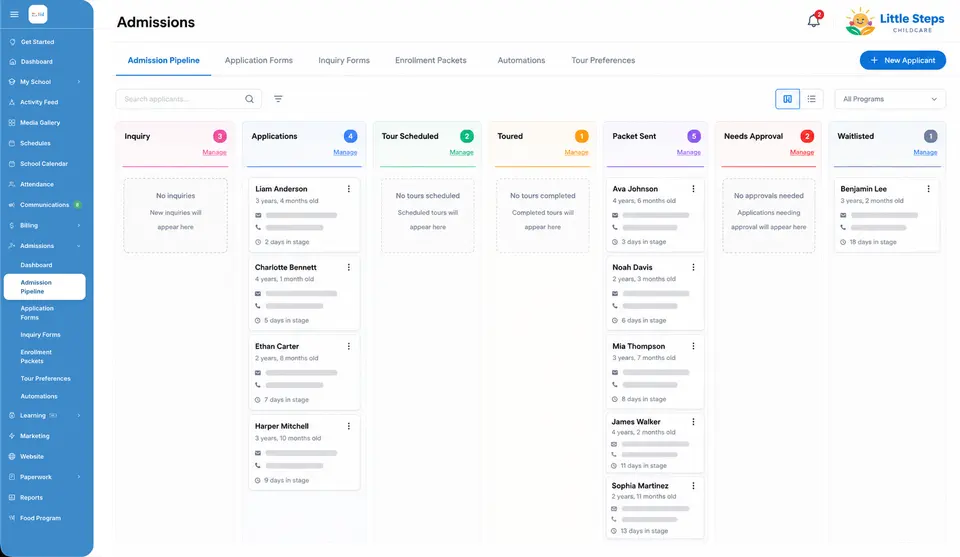
- A visual enrollment pipeline. Every family on one board, moving through stages from inquiry to enrolled, so you can see exactly who needs a nudge. See enrollment software.
- Tour scheduling. Families pick a tour time from your real availability online — no phone tag — and get automatic reminders so they actually show up.
- Automated follow-up. Trigger-based emails and texts nurture each family — a welcome, a tour reminder, a post-tour thank-you — without you lifting a finger.
- Waitlist management. A living waitlist that ranks families and lets you fill an open spot in a couple of clicks — not a stale spreadsheet.
- Conversion reporting. See where families drop off — inquiry to tour, tour to enroll — so you can fix the leak. See reports & analytics.
- Connected to billing. The moment a family enrolls, they flow into billing, autopay, and attendance — no re-typing, no dropped details.
Spreadsheet vs generic CRM vs childcare CRM
Plenty of centers run enrollment on a spreadsheet, and some try to bend a generic sales CRM to fit. Here is how the three stack up on what actually matters for filling rooms:
| Capability | Spreadsheet | Generic CRM | Childcare CRM |
|---|---|---|---|
| Website inquiry capture | Manual entry | Forms, but generic | Built for enrollment |
| Tour scheduling | No | Add-on / clunky | Online, with reminders |
| Automated follow-up | No | You build it | Childcare templates ready |
| Waitlist management | Goes stale | No | Ranked & live |
| Understands rooms & ratios | No | No | Yes |
| Flows into billing & attendance | No | Separate tools | One platform |
| Setup for a director | Free, all manual | Weeks of config | Same-day, free migration |
A spreadsheet is free but leaks leads. A generic CRM is powerful but was not built for the way families enroll in childcare, so you spend weeks configuring it and still do not get tours or waitlists. A purpose-built childcare CRM wins because it already speaks childcare on day one.
Curious what your enrollment pipeline could look like?
Spin up a free MyKidReports account and see every inquiry, tour, and waitlist family on one board.
How a childcare CRM works, step by step
Here is the journey a family takes once a childcare CRM is running behind the scenes — and what happens automatically at each stage:
1. The inquiry arrives
A parent submits your website form (or you log a phone call). A lead is created instantly and an automatic reply goes out within seconds — “Thanks, Sarah! Here are three tour times that work this week.”
2. The tour gets scheduled
The family picks a time from your real availability, and the CRM sends confirmation and reminder messages so they actually show up. No phone tag, no double-booking.
3. Follow-up runs itself
After the tour, an automated sequence keeps your center top of mind — a thank-you, answers to common questions, a gentle “spots are filling” nudge — timed so you never have to remember.
4. The family enrolls
You send the enrollment packet and e-sign forms right from the record. Everything the family entered carries over — no re-typing names, birthdays, or contacts.
5. They flow into your center
The enrolled child lands in billing with autopay set up, appears in attendance, and the family gets the free parent app. One record, first inquiry to first payment.
Childcare CRM vs childcare management software
These two terms get used interchangeably, but they solve different halves of the job:
- A childcare CRM handles the front of the funnel — turning strangers into enrolled families (leads, tours, waitlists, follow-up).
- Childcare management software runs everything after enrollment — attendance, ratios, billing, daily reports, and parent communication.
You need both, and the magic happens when they are the same platform. When your CRM and your daycare management software are one system, a family flows from first inquiry straight into tuition and attendance with zero re-entry. Bolt a standalone CRM onto separate billing software and you are back to copying data between tools — which is exactly where errors and dropped families come from.
How to choose the right childcare CRM (2026 checklist)
When you are comparing options, score each one against this list. The best fit for most centers checks every box:
- Built for childcare, not adapted to it. It should already know tours, waitlists, rooms, and ratios out of the box.
- Instant, automated response. Speed-to-lead is the biggest driver of tour bookings — new inquiries should get an automatic reply in seconds.
- Connected to billing and attendance. Avoid tools that leave you re-typing enrolled families into a separate system.
- Simple enough for a busy director. If it needs a consultant to set up, it will not get used. Look for same-day setup and free migration of your existing leads.
- Transparent, center-friendly pricing. Watch out for quote-only enterprise tools; per-child or free-tier pricing scales with your size.
- Reporting you will actually read. Simple conversion numbers beat a dashboard nobody opens.
How much does a childcare CRM cost?
Standalone childcare CRMs typically start around $80–$150 per month for a single center and climb into the hundreds for larger or multi-site programs, with the biggest enterprise platforms quote-only. That is a real cost when the CRM is a separate tool on top of your billing and attendance software.
The more economical route is a platform where the CRM is already included. MyKidReports bundles the full childcare CRM — lead capture, pipeline, tours, waitlists, and automated follow-up — inside its all-in-one platform: free for up to 5 children, then $0.99 per child per month. For most centers that is a fraction of a dedicated CRM, and there is nothing extra to buy because billing, attendance, and the parent app are in the same login.
Fill your rooms with a childcare CRM built for you.
Lead capture, tours, waitlists, and automated follow-up — connected to billing and a free parent app.
Frequently asked questions
What is a childcare CRM?
A childcare CRM is software that captures every enrollment inquiry, tracks each prospective family through a tour-to-enrollment pipeline, and automates the follow-up so no lead slips away. Unlike a generic sales CRM, it is built around the enrollment journey — inquiry forms, tour scheduling, waitlists, and reminders — usually connected to enrollment and billing.
How is a childcare CRM different from childcare management software?
A childcare CRM focuses on the front of the funnel — turning inquiries into enrolled families. Childcare management software runs the center after a child is enrolled: attendance, ratios, billing, and parent communication. The best platforms include both, so a lead flows from first inquiry into billing without re-keying anything.
Do small daycares really need a CRM?
Yes. Even a small home daycare loses families when inquiries sit in an inbox for two days. A childcare CRM answers every lead instantly, schedules the tour, and reminds the family — exactly where small centers usually lose enrollments. Because pricing often scales per child, a small center can run a full CRM for a few dollars a month or free.
What features should a childcare CRM have?
Website lead-capture forms, a visual enrollment pipeline, online tour scheduling, automated email and text follow-up, waitlist management, conversion reporting, and a direct connection to enrollment and billing. Anything missing means more manual work and more leads lost.
How much does a childcare CRM cost?
Standalone childcare CRMs often run from roughly $80 to several hundred dollars per month, and enterprise tools are quote-only. MyKidReports includes the CRM inside its all-in-one platform — free for up to 5 children, then $0.99 per child per month — so most centers pay far less than a dedicated CRM.
Can a childcare CRM integrate with billing and attendance?
It should. When the CRM is part of your childcare management platform, an enrolled family flows straight into billing, autopay, attendance, and the parent app with no duplicate data entry. Bolting a generic CRM onto separate billing software creates re-keying and errors.
How does a childcare CRM increase enrollment?
Three ways: it responds to every inquiry instantly (speed-to-lead is the biggest driver of tour bookings), it automates follow-up so warm families are not forgotten, and it shows you exactly where families drop off so you can fix the leak. Centers commonly recover enrollments that used to slip away in a busy inbox.
Is MyKidReports a good childcare CRM?
MyKidReports includes a full childcare CRM — website lead capture, an 8-stage enrollment pipeline, tour scheduling, waitlists, and automated follow-up — connected to billing, attendance, and a free parent app. It is free for up to 5 children, then $0.99 per child per month, with same-day setup and free migration. See the childcare CRM ›
Keep exploring
- Childcare CRM — the full lead-to-enrollment platform.
- Childcare enrollment software — applications, tours, and e-sign packets.
- Childcare billing software — autopay, invoicing, and subsidy splits.
- Childcare management software — run the whole center in one login.
- How to start a daycare — a step-by-step guide for new programs.
Ready to fill your rooms?
Try the MyKidReports childcare CRM free — up to 5 children, no card required.